
USB-MIDI → Bluetooth bridge for the Zoom F8 series
Real faders for F8-series recorders
Plug in your MIDI controller and control the recorder’s faders, trim, pan, track arming and transport. Korg nanoKONTROL and Behringer X-Touch work straight away, and any other controller can be mapped in a few minutes. One Fader Bridge also handles two recorders at once.
Enclosure files, firmware and a guide: what to buy and how to assemble it. Instant download. €69. Details
Delivery to an InPost parcel locker in Poland €5, shipped within 2 working days. 14 days to return without giving a reason.
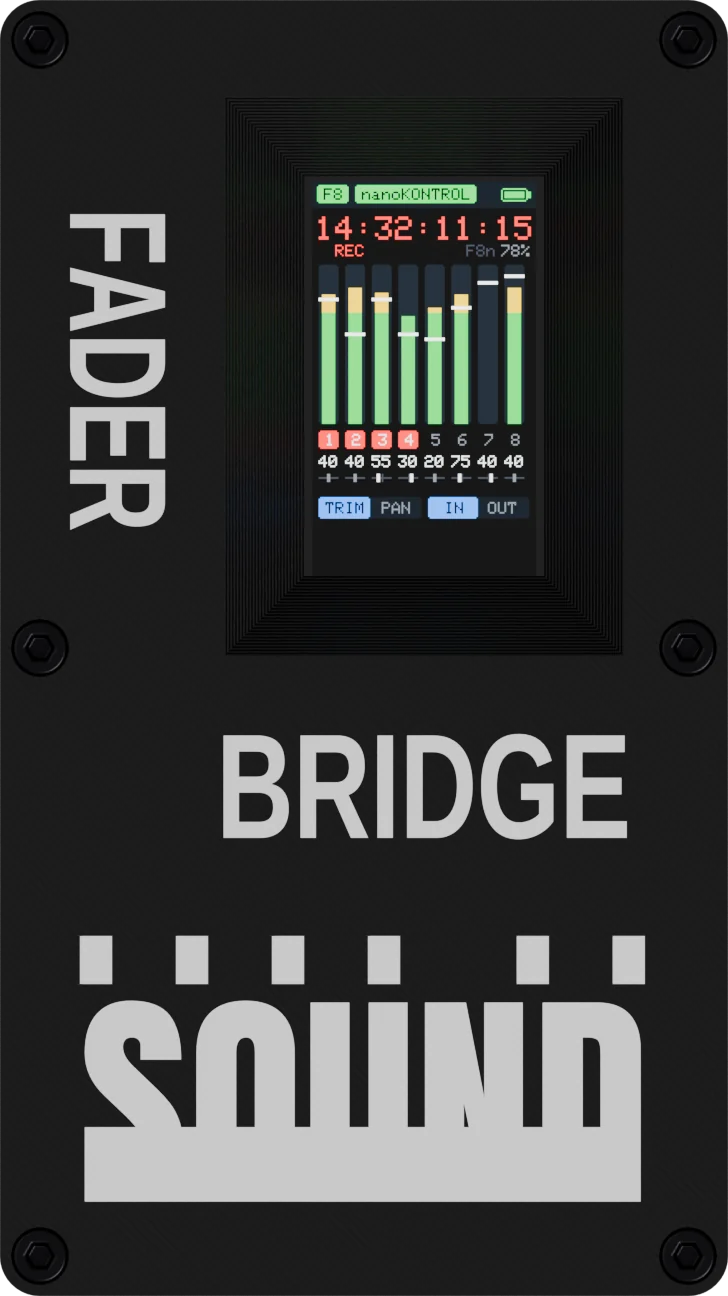
Drag to rotate
How it works
Controller on a cable, recorder without one
Zoom discontinued the FRC-8 remote, but F8-series recorders still accept commands over Bluetooth, just like from the F8 Control app. Fader Bridge speaks the same language — only instead of a finger on a tablet you get physical faders.
Two recorders
Run two Zooms from one controller
Fader Bridge stays connected to two F8-series recorders at the same time. You get 16 inputs under one controller and one record button for both machines.
- REC and STOP go to both recorders at once. Recording on both machines starts and stops with one button.
- The second recorder joins on its own. Turn on F8 Control and it is there — no pairing, no mode switching.
- Switch the faders between recorders. On the nanoKONTROL with the scene (1 and 3 → recorder A, 2 and 4 → B), on the X-Touch with BANK / CHANNEL.
- Each recorder keeps its slot. After a restart the faders will not swap machines.
- The screen shows which one you are controlling, and the other one’s status appears as a dot in the header.
Controllers
Plug in your controller
Korg nanoKONTROL and Behringer X-Touch have ready-made maps and work as soon as you plug them in. Any other USB-MIDI controller can be mapped with the on-screen wizard. Faders use soft takeover: they only move a parameter once they “catch” the recorder’s value, so levels never jump.
CH 1 · trim in the recorder
+40
waiting: turn the knob to the recorder’s value
Turn it: drag up and down, use the mouse wheel or the arrow keys. The yellow marker is the value in the recorder. Until the knob catches it nothing changes, so the level never jumps. That is soft takeover.
| Korg nanoKONTROL / nanoKONTROL2 | Recorder |
|---|---|
| Faders 1–8 | Input faders 1–8 |
| Knobs 1–8 | Trim or pan (CYCLE toggles) |
| S / M / R | ARM / PFL monitoring / pan to centre |
| ▶ ■ ● ◀◀ ▶▶ | Transport 1:1 |
| TRACK ▶ | Second layer: faders 1–3 → outputs |
| MARKER SET | Slate (hold) |
| SCENE | Select recorder A / B |
| Behringer X-Touch / Compact | Recorder |
|---|---|
| Faders 1–8 (motorised) | Input faders; they travel to the recorder’s values on their own |
| MASTER | Fader L/R |
| Encoders 1–8 | Trim / pan, push = pan to centre |
| REC / SOLO | ARM / PFL |
| FLIP | Second layer: faders 1–3 → outputs |
| BANK / CHANNEL | Select recorder A / B |
| Displays | Timecode, channel names, level in dB, meters |
Another controller
Mapping wizard
Plug in any class-compliant USB-MIDI controller. Fader Bridge does not know it, so it starts the wizard and asks for each control on screen: MOVE FADER 1, TURN KNOB 1, PRESS ARM 1, PRESS PFL 1. Fewer faders on your controller? Wait 5 seconds and the wizard moves to the next row. The mapping is stored in the device, separately for each of the two recorders.
Screen
You know what is happening before you ask
When switched on, the device looks for the recorder and the controller by itself. If something is missing, the screen tells you what to enable in the recorder’s menu.
Compatibility
Before you order
Recorders
- Zoom F8 series with F8 Control (MENU › SYSTEM › Bluetooth)
- One or two recorders at the same time
- Other Zoom series (F3, F4, F6) are not supported
Controllers
- Korg nanoKONTROL (1st generation) and nanoKONTROL2: ready-made maps, detected automatically
- Behringer X-Touch and X-Touch Compact in MC (Mackie Control) mode: ready-made map with motorised faders
- Any other class-compliant USB-MIDI controller: through the mapping wizard
- The controller is not included
Power
- 5 V from USB, at least 1 A: a charger, a power bank or a D-Tap/Hirose → USB adapter
- The whole setup, Korg included, draws less than 0.6 A
Inside
What is inside
- M5StickS3 module (M5Stack): ESP32-S3 processor, Bluetooth, 1.14″ screen and battery
- USB adapter that feeds power to the controller
- 3D-printed enclosure, held together with steel M2 screws in brass threaded inserts
- Our firmware: controller maps, mapping wizard, support for two recorders
Specifications
- Recorder link
- Bluetooth LE (F8 Control protocol), up to 2 recorders
- Controller input
- USB, USB-MIDI class
- Screen
- 1.14″, 135 × 240 px
- Power
- 5 V USB, ≥ 1 A
- Battery
- Li-Po 250 mAh
- Dimensions
- 81 × 45.5 × 20.5 mm
- In the box
- Fader Bridge, manual with safety information
There is a lithium-polymer battery inside. Do not leave the device in a hot car or in the sun, do not crush or puncture it. Power it only from 5 V USB. Do not throw a worn-out device in the bin; take it to an electronic waste collection point.
Questions
FAQ
Is this a Zoom product?
No. Fader Bridge is an independent accessory, not affiliated with Zoom Corporation. It uses the publicly documented Bluetooth protocol that the F8 Control app uses.
My controller is not on the list. Will it work?
If it is a class-compliant USB-MIDI controller (it works on a computer without drivers), you can map it with the on-screen wizard. Controllers that need their own drivers will not work.
How do I control two recorders?
Turn on F8 Control in both. The second one joins on its own. REC and STOP act on both at once, and you switch the faders with the scene on the Korg or with BANK / CHANNEL on the X-Touch.
Do I need to install anything on the recorder?
Just turn on F8 Control in the recorder’s Bluetooth menu. If your model needs the Bluetooth add-on, download it from zoomcorp.com; the included manual walks you through it step by step.
What is the range?
The device usually sits next to the recorder on the cart or in the bag. In practice a few metres without obstacles is more than enough.
Will I get firmware updates?
Yes. Updates are installed over USB-C; we publish the instructions on this page.
What if it does not work with my gear?
You have 14 days to withdraw from the contract without giving a reason, and for 2 years we are liable for the goods’ conformity with the contract. Details in the terms of sale.
Do you issue invoices?
Yes. If you enter your tax ID in the payment form, you will receive a VAT invoice by e-mail. Without a tax ID a fiscal receipt is in the parcel. The tax ID must be given before payment: after the purchase we cannot issue a company invoice for a receipt.
Can I build a Fader Bridge myself?
Yes. Fader Bridge DIY (€69) gives you the enclosure files for 3D printing, our firmware and a PDF guide: what to buy (about €40 of parts), how to print, flash the firmware from your browser and screw it together. It works exactly like the ready-made one.
Order
Fader Bridge — €119
- Pay by card in euro through Stripe
- Delivery to an InPost parcel locker in Poland: €5 for the whole order
- Receipt in the parcel, or a VAT invoice by e-mail if you give a tax ID
- Order confirmation and tracking number by e-mail
- Every unit tested before shipping
Enclosure files, firmware and a guide: what to buy and how to assemble it. Instant download. €69. Details
Add RF Shields or a Plug-on Cage to the same parcel at no extra delivery cost.